किसी स्कूल के HM ने अभी Admit Card download किया। Student का नाम गलत है — Ramesh की जगह Ramesh Kumar लिखा है, या Date of Birth एक साल पीछे है। Exam कल है। यह situation राजस्थान के सैकड़ों स्कूलों में हर बोर्ड परीक्षा से पहले आती है। घबराने की जरूरत नहीं है, लेकिन समझना होगा कि error किस level का है, क्योंकि fix करने का तरीका error के source पर depend करता है।
Admit Card में कौन-कौन से Errors आते हैं
Shala Darpan के 5th और 8th Exam portal rajshaladarpan.rajasthan.gov.in से जो admit card generate होता है, उसमें ये details होती हैं:
- Student का नाम (जैसा Application Form में भरा गया)
- माता-पिता का नाम
- Date of Birth
- Roll Number
- School का नाम और NIC-SD Code
- Exam Center
- विषय सूची
- Student की Photo
इनमें से सबसे अधिक errors इन क्षेत्रों में मिलते हैं:
- नाम की spelling गलत — यह सबसे common है। Application Form में जो नाम भरा गया था, वही admit card पर आता है। अगर data entry के समय “Pooja” की जगह “Puja” टाइप हुआ, तो वही print होगा।
- Date of Birth गलत — SR (Scholar Register) से जो date ली गई थी उसमें discrepancy थी, या Form भरते वक्त galti हुई।
- Photo नहीं आई / धुंधली है — Photo upload सही format में नहीं हुई थी, या upload के बाद save properly नहीं हुआ।
- माता-पिता का नाम गलत — हिंदी और English transliteration के दौरान spelling mismatch।
- Exam Center गलत लग रहा है — यह आमतौर पर error नहीं होता, center mapping DIET level पर होती है। लेकिन अगर school का mapping ही गलत हुआ है, तो यह अलग process है।
पहले यह तय करें: Error School Level का है या ऊपर का
Admit Card पर जो गलती दिखती है, उसकी दो संभावनाएं होती हैं:
- Case A — Error आपके School के Application Form में है। जब school ने student का form भरा था उस समय गलत data enter हुआ। इस error को आप School Login से देख सकते हैं और — अगर Correction Window खुली है — तो fix भी कर सकते हैं।
- Case B — Error Scholar Register (SR) में है। Student का SR data ही गलत है, जो Shala Darpan के main portal (rajshaladarpan.rajasthan.gov.in — Staff Corner/School section) में है। इस data ने application में आकर admit card को प्रभावित किया। इसे fix करना अलग process है।
- Case C — Error portal का है, data सही है। यह rare है, लेकिन होता है — खासकर जब portal update हुआ हो या server sync में देरी हो। इस case में Help Desk contact करना पड़ता है।
यह distinction समझना जरूरी है, क्योंकि बिना source जाने action लेने से समय बर्बाद होता है।
Step 1: School Login से Error Verify करें
सबसे पहले portal पर खुद जांचें कि data क्या show हो रहा है।
URL: rajshaladarpan.rajasthan.gov.in → 5th & 8th Exam section → School Login
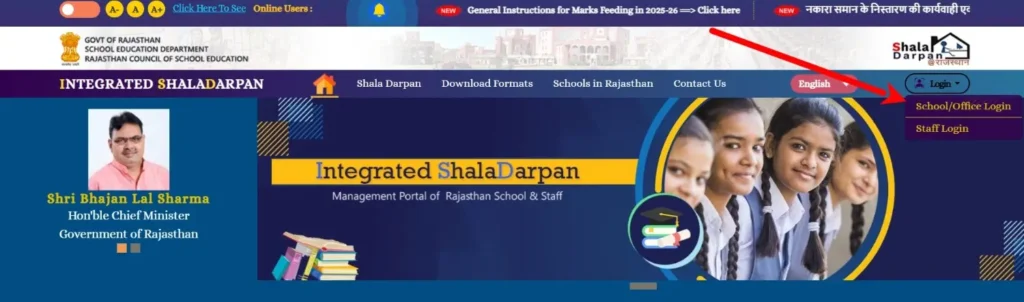
Login के बाद:
- अपने School के registered students की list खोलें।
- जिस student के admit card में error है, उसका record open करें।
- वहां जो नाम / DOB / photo दिख रही है — वही admit card पर आएगी।
अगर portal पर भी data गलत है → यह Case A या B है, fix करना होगा। अगर portal पर data सही है लेकिन admit card में गलत आ रहा है → यह Case C है, Help Desk call करें।
Step 2: Application Form Correction Window का उपयोग करें (अगर खुली हो)
अगर Correction Window अभी खुली है:
- School Login → अपने NIC-SD ID और password से login करें।
- Student list में उस student को select करें जिसका data गलत है।
- Edit / Correction option पर click करें।
- नाम, DOB, माता-पिता का नाम — जो भी गलत है — सही करें।
- अगर photo गलत है या नहीं आई, तो यहीं से re-upload करें। Photo JPEG format, size 10KB से 100KB के बीच, white background में होनी चाहिए।
- Save करने के बाद Revised Admit Card फिर से download करें।
अगर Correction Window बंद हो चुकी है: Portal पर खुद correction नहीं होगा। आगे का रास्ता DIET और Help Desk है — नीचे देखें।
Step 3: Scholar Register में Error है तो यह करें
अगर admit card की गलती Scholar Register (SR) के गलत data से आई है, तो school portal से सीधे fix नहीं होगा। इसके लिए:
- Main Shala Darpan portal (rajshaladarpan.rajasthan.gov.in) → School Login → Student Profile section में जाएं।
- Student का SR record खोलें। “Format 5” या “Format 9” में entry देखें।
- अगर SR में भी data गलत है, तो उसे update करने के लिए valid proof चाहिए — Aadhar Card, Birth Certificate, या पिछली class की Marksheet।
- HM को यह correction school level पर initiate करना होगा और DDO/DIET को supporting documents भेजने होंगे।
- SR correction के बाद 5th & 8th Exam portal पर data sync होने में 24–48 घंटे लग सकते हैं।
समय कम हो तो SR correction और Help Desk — दोनों parallel में चलाएं।
Step 4: Help Desk से Contact करें
Portal पर एक dedicated Help Desk section है:
URL: rajshaladarpan.rajasthan.gov.in → Help Desk
Integrated Shala Darpan Rajasthan का official address है: 603 (Old 505), पंचम मंजिल, पंचम ब्लाक, राजस्थान स्कूल शिक्षा परिषद्, शिक्षा संकुल, जे.एल.एन. मार्ग, जयपुर – 302017।
Help Desk contact करते वक्त यह information ready रखें:
- School का NIC-SD Code
- Student का Roll Number (admit card पर जो है)
- Student का नाम (जो portal पर है और जो admit card पर आया है — दोनों)
- गलती का screenshot
- Aadhar / Birth Certificate — जो सही data prove करे
Email करें तो subject line में “Admit Card Error — Class [5/8] — School Code [XXXXX] — Roll No [XXXXX]” लिखें। इससे ticket faster process होती है।
Exam Day पर Error अभी भी है — तो यह करें
Student को exam center पर यह साथ ले जाना है:
- Original (गलत) Admit Card — यह जरूरी है, बिना इसके entry नहीं मिलेगी।
- Aadhar Card — जिस पर सही नाम और DOB है।
- School Principal / HM का एक letter — जिसमें clearly लिखा हो कि admit card पर नाम/DOB में क्या गलती है और actual correct data क्या है, school seal और signature के साथ।
- अगर पिछले साल की Marksheet है तो वो भी।
Exam Center Invigilator और Center Superintendent को यह documents दिखाएं। आमतौर पर Superintendent level पर यह entry allow होती है — लेकिन यह उनके discretion पर है, इसलिए proper documents जरूरी हैं।
DIET को कब और कैसे Escalate करें
अगर error सिर्फ एक student का नहीं, बल्कि कई students के admit cards में है — या portal पर correction window बंद है और Help Desk respond नहीं कर रही — तो DIET (District Institute of Education and Training) में जाना जरूरी है।
अपने जिले के DIET में जाएं, यह documents लेकर:
- School का NIC-SD Code और HM की ID
- Affected students की list — Roll Number और error के साथ
- Supporting documents (Aadhar / Marksheet)
- Portal का screenshot जहां data गलत दिख रहा है
DIET के पास CBEO/DEO login होता है जिससे कुछ corrections office level पर possible हैं।
FAQs
Admit card download ही नहीं हो रहा, blank page आ रहा है — क्या करें?
यह browser issue है। Chrome या Firefox latest version में try करें। Browser का cache clear करें (Ctrl+Shift+Delete). PDF plugin enable है या नहीं check करें। अगर फिर भी नहीं आता, दूसरे device से try करें — कभी-कभी mobile browser पर जो download नहीं होता वो desktop पर हो जाता है।
School Login का password भूल गए — अब क्या?
Portal पर login page पर “Forgot Password” option है। Registered mobile पर OTP आएगा। अगर registered mobile number भी change हो गया है, तो DIET या Help Desk से contact करना होगा।
Student का नाम Aadhar में अलग है और School Record में अलग — admit card किस पर base है?
Admit card school record पर based है, जो Application Form के time enter हुआ था। Aadhar से automatic sync नहीं होता। अगर दोनों में mismatch है, exam center पर दोनों documents साथ रखें और HM का letter जरूर लें।
Photo सही upload हुई थी लेकिन admit card पर नहीं आई या blurred है — portal error है या हमारी गलती?
अगर आपने photo सही format (JPEG, white background, 10KB–100KB) में upload की थी और portal ने “Saved” confirm किया था, तो Help Desk को screenshot के साथ report करें। अगर upload के वक्त confirmation नहीं लिया था, तो Correction Window में फिर से upload करें।
एक बात जो ज्यादातर लोग Miss करते हैं
Admit card error सिर्फ exam entry की problem नहीं है। अगर आज इसे ignore किया और student exam pass कर लेता है, तो Marksheet पर भी वही गलत नाम / DOB आएगी। उसे बाद में correct करवाना और भी मुश्किल और time-consuming है।
इसलिए — error दिखते ही उसी दिन action लें। Portal check करें, source identify करें, और सही channel से fix शुरू करें। Exam center पर letter ले जाना backup है, solution नहीं।
⚡ Read Also: Shala Darpan Infrastructure Profile Update