TAF का ऑप्शन Staff Corner में दिखता है। क्लिक करो — और कक्षाएं खाली हैं। या form open होती है लेकिन जिस कक्षा को पढ़ाते हो, वह list में नहीं। यह technical error नहीं है। एक step पहले से miss हो गई है — Class-Teacher Mapping। यही वह जगह है जहां अधिकांश शिक्षक अटकते हैं। TAF भरना कोई जटिल काम नहीं, लेकिन इसका सही sequence समझे बिना portal बार-बार आधा काम करके रुक जाता है। यह article उसी sequence को सही क्रम में explain करता है — पहले school side का काम, फिर staff side का।
TAF है क्या और यह जरूरी क्यों है
TAF का पूरा नाम है Teacher Appraisal Format — शिक्षक मूल्यांकन प्रपत्र। यह PINDICS (Performance Indicators for Elementary School Teachers) framework पर based है, जिसे Ministry of Education ने approve किया है। राजस्थान में class 1 से 8 तक पढ़ाने वाले प्राथमिक और माध्यमिक शिक्षकों के लिए TAF भरना अनिवार्य है। संस्था प्रधानों को भी अलग format में यह भरना होता है। TAF को साल में दो बार (छ:माही आधार पर) भरा जाता है। यह सिर्फ एक survey नहीं है — यह APR (Annual Performance Report) से directly linked है, और increment processing में इसकी entry matter करती है। जिस शिक्षक ने TAF submit नहीं किया, उसके service record में gap visible होती है।
TAF भरने से पहले — यह काम school login से होना चाहिए
यहां वह step है जो अक्सर skip हो जाती है।
TAF में teacher को वही कक्षाएं दिखती हैं जो portal पर उनके साथ map की गई हैं। अगर school administrator ने Class-Teacher Mapping नहीं की है, तो teacher का TAF form खुलेगा जरूर — लेकिन कक्षाओं की list या तो खाली होगी या incomplete।
इसलिए: TAF opening से पहले School Login से Class-Teacher Mapping complete होनी चाहिए।
यह काम school का authorized data operator या संस्था प्रधान करता है।
School Login से Class-Teacher Mapping के steps:
- Step 1: Official portal खोलें — rajshaladarpan.rajasthan.gov.in
- Step 2: Homepage पर “School Login” पर click करें।
- Step 3: School Login ID और password enter करें, Captcha fill करें, Login button दबाएं।
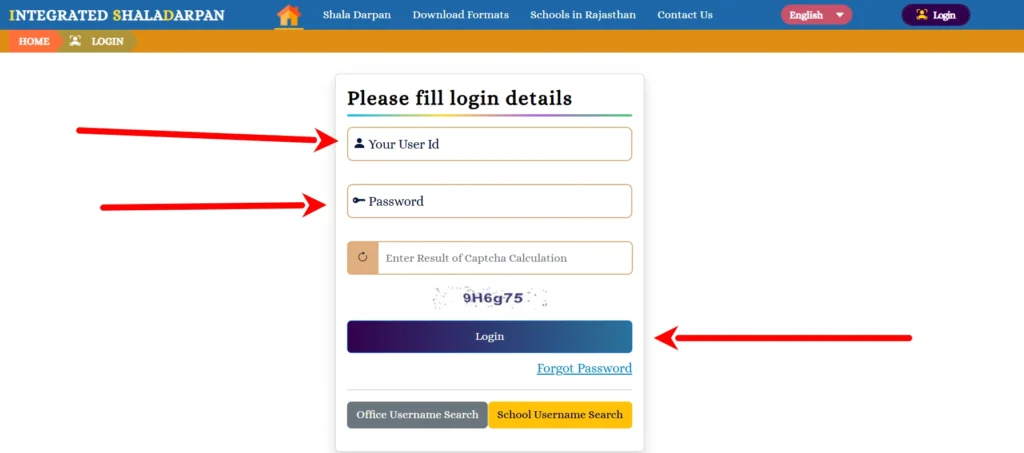
- Step 4: School dashboard खुलने के बाद Student/Class section में जाएं। यहां Class-Teacher Mapping या Subject Teacher Assignment का option होगा।
- Step 5: जिस कक्षा के लिए mapping करनी है, उसे select करें। फिर Teacher Type 1 में “Working” select करें — इससे school में कार्यरत सभी शिक्षकों के नाम show होंगे।
- Step 6: सही शिक्षक को select करें। Teacher Type 2 में — अगर उस subject को सिर्फ एक ही शिक्षक पढ़ाता है तो “NA” select करें।
- Step 7: Submit करें। यही process school की हर कक्षा के लिए दोहरानी होगी।
यह mapping जब तक complete नहीं होगी, teacher TAF में उन कक्षाओं को नहीं देख पाएगा।
अब Staff Login से TAF तक — यह रास्ता है
Class-Teacher Mapping हो जाने के बाद अब teacher खुद अपना TAF fill कर सकता है।
- Step 1: Portal खोलें — rajshaladarpan.rajasthan.gov.in
- Step 2: Homepage पर “Staff Window” tab पर click करें।
- Step 3: Staff Window page पर “Staff Login” button पर click करें।
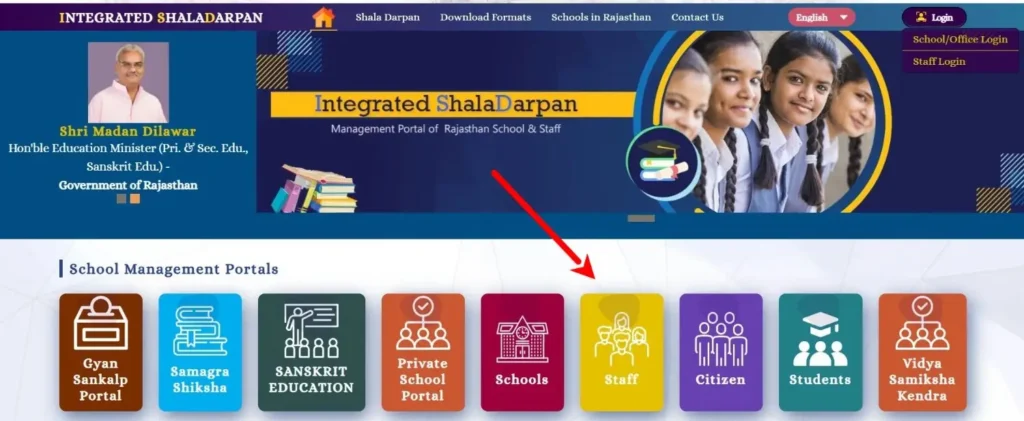
- Step 4: अपना User ID और Password enter करें। Captcha fill करें। “Login” button दबाएं।
- Step 5: Login के बाद teacher का personal dashboard खुलेगा — जिसमें नाम, school, designation visible होगा।
- Step 6: Dashboard के left side में तीन arrows (≡ menu) या sidebar navigation दिखेगा। उस पर click करें।
- Step 7: Menu में “Staff Corner” section दिखेगा। उसे expand करें।
- Step 8: Staff Corner के अंदर “TAF” या “Show TAF” link मिलेगा। उस पर click करें।
- Step 9: TAF section खुलेगा। यहां active छ:माही period visible होगा — पहली (April–September) या दूसरी (October–March)। जो current period active है, उसे select करें।
TAF Form के अंदर — PINDICS indicators कैसे भरें
TAF form में दो main parts होते हैं: शिक्षक का section और संस्था प्रधान का section। Teacher अपना खुद भरता है।
Form में PINDICS-based performance indicators होते हैं जो कई domains में divided हैं:
- Domain 1 — Content Knowledge and Pedagogy (विषय ज्ञान और शिक्षण पद्धति): इसमें teacher assess करता है कि वह subject किस हद तक समझाता है, multi-level teaching करता है या नहीं, teaching aids use करता है या नहीं।
- Domain 2 — Learning Environment (शिक्षण वातावरण): Classroom management, student participation, inclusive practices।
- Domain 3 — Student Assessment (छात्र मूल्यांकन): Formative assessment, feedback देने की practice, remedial teaching।
- Domain 4 — Professional Development (व्यावसायिक विकास): Training attended, self-learning initiatives।
- Domain 5 — School and Community Engagement: SMC meeting participation, parent connect।
हर indicator पर typically 1 से 4 तक rating होती है — 1 = Needs Improvement, 4 = Excellent। कुछ fields में descriptive text भी fill करना होता है।
- Class-wise entry: Form में जिन कक्षाओं की mapping हुई होगी, वही visible होंगी। हर कक्षा के लिए separately data fill करना होगा।
- Step जब form complete हो जाए: नीचे “Save/Submit” button होगा। पहले “Save” करें — ताकि progress save हो। Final submission से पहले पूरा form review करें।
Submit के बाद — Verify करें
TAF submit होने के बाद portal confirmation show करता है। लेकिन सिर्फ confirmation message काफी नहीं — submission को verify भी करें।
Verification के steps:
- Staff Corner में दोबारा TAF section open करें।
- Submit हुई entry पर status देखें — “Submitted” या “Locked” दिखना चाहिए।
- अगर status pending है, तो submission complete नहीं हुई — form दोबारा open करके submit करें।
Form में कक्षाएं नहीं दिख रहीं — या Form Blank है
यह सबसे common issue है।
कारण: Class-Teacher Mapping नहीं हुई, या incomplete है।
Solution:
- School Login से check करें कि आपकी कक्षाओं की mapping हुई है या नहीं।
- अगर नहीं हुई — school administrator या संस्था प्रधान से mapping करवाएं।
- Mapping complete होने के बाद Staff Login से TAF दोबारा खोलें।
Portal slow है या page load नहीं हो रहा:
- Non-peak hours में try करें — सुबह जल्दी या शाम को।
- Browser cache clear करें।
- Chrome या Firefox use करें। Internet Explorer पर portal ठीक से नहीं चलता।
Captcha error बार-बार आ रहा है:
- Page refresh करें — new captcha generate होगा।
- Mobile पर captcha difficult लगे तो desktop या laptop use करें।
Password याद नहीं:
- Staff Login page पर “Forgot Password” option है।
- Registered mobile number पर OTP आएगा।
- Password reset होने के बाद login करें।
FAQs
TAF साल में कितनी बार भरना होता है?
दो बार — पहली छ:माही (April–September) और दूसरी छ:माही (October–March)। दोनों periods के TAF अलग-अलग submit होते हैं।
संस्था प्रधान (Head Teacher/Principal) को भी TAF भरना होता है?
हां। संस्थाप्रधान का अलग format होता है जो उनके administrative और academic supervision role को assess करता है। उनका TAF भी Staff Corner से ही भरा जाता है।
क्या TAF submit होने के बाद edit हो सकती है?
एक बार final submit होने के बाद आमतौर पर editing lock हो जाती है। इसीलिए final submit से पहले पूरा form verify करें। अगर correction जरूरी है तो block office से unlock request करनी होती है।
TAF और APR में क्या फर्क है?
APR (Annual Performance Report) overall annual evaluation है। TAF उसका एक input है — खासकर teaching performance और professional growth का। TAF data APR process में feed होता है।