Mission Start 2.0 राजस्थान सरकार का वह कार्यक्रम है जो सत्र की शुरुआत में कक्षा 1 से 8 तक के विद्यार्थियों की आधारभूत दक्षताओं — पढ़ना, लिखना, गणित — की स्थिति को रिकॉर्ड करता है। यह कोई मूल्यांकन परीक्षा नहीं है। यह एक baseline data collection है जो यह बताती है कि प्रत्येक बच्चा सत्र शुरू होने पर किस स्तर पर है।
Shala Darpan पोर्टल पर Weekly Table Entry इसी कार्यक्रम का वह हिस्सा है जहाँ स्कूल को सप्ताह-दर-सप्ताह यह दर्ज करना होता है कि कितने बच्चों ने किस दक्षता पर काम किया, कितने उपस्थित रहे, और गतिविधियाँ कैसी रहीं। यह entry सिर्फ रिकॉर्ड के लिए नहीं है — DIET और ब्लॉक स्तर के अधिकारी इसी data को monitor करते हैं।
अगर यह entry समय पर नहीं होती, तो स्कूल की compliance रिपोर्ट में gap दिखता है, जो बाद में नोटिस का कारण बनता है।
Shala Darpan पर Weekly Table Entry का सही रास्ता
बहुत से शिक्षकों को पोर्टल पर यह option ढूंढने में समय लग जाता है क्योंकि Mission Start 2.0 का section हर सत्र में थोड़ा अलग जगह होता है। नीचे दिया गया path अभी active है:
rajshaladarpan.rajasthan.gov.in पर login करें → बायीं तरफ menu में “School” tab चुनें → वहाँ “Mission Start 2.0” का option दिखेगा → उसके अंदर “Weekly Table Entry” पर क्लिक करें।
अगर यह option दिख नहीं रहा, तो दो कारण हो सकते हैं:
- आपके login की role “Teacher” है जबकि यह entry HM login से होती है।
- Session/week अभी open नहीं हुआ — यानी विभाग ने उस सप्ताह की entry window अभी activate नहीं की।
HM login यानी Head Master का SSOID — यही वह account है जिससे यह entry submit होती है।
Weekly Table में क्या-क्या भरना होता है
Entry screen पर एक table खुलती है जिसमें class-wise rows होती हैं। हर row में निम्नलिखित columns होते हैं:
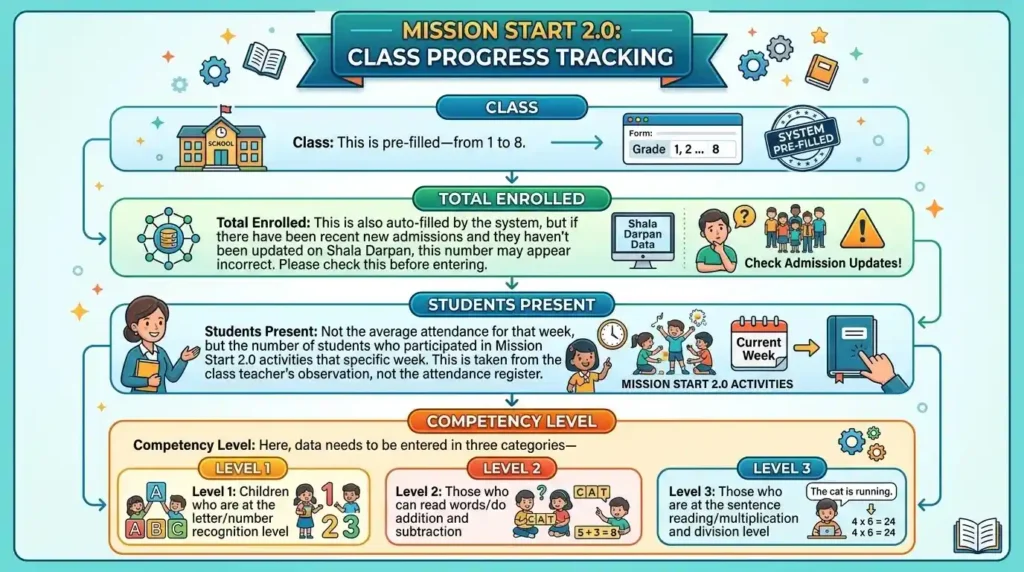
- कक्षा (Class): यह पहले से filled होता है — 1 से 8 तक।
- कुल नामांकित विद्यार्थी (Total Enrolled): यह भी system से auto-fill होता है, लेकिन अगर हाल ही में कोई नया admission हुआ हो और Shala Darpan पर update नहीं किया गया हो, तो यह संख्या गलत दिख सकती है। Entry से पहले यह check कर लें।
- उपस्थित विद्यार्थी (Students Present): उस सप्ताह औसत उपस्थिति नहीं, बल्कि उस specific सप्ताह में Mission Start 2.0 की गतिविधि में भाग लेने वाले बच्चों की संख्या। यह attendance register से नहीं, बल्कि कक्षा शिक्षक की observation से लेनी होती है।
- दक्षता स्तर (Competency Level): यहाँ तीन category में data भरना होता है —
- स्तर 1: जो बच्चे अक्षर/अंक पहचान के स्तर पर हैं
- स्तर 2: जो शब्द पढ़ने / जोड़-घटाव कर सकते हैं
- स्तर 3: जो वाक्य पढ़ने / गुणा-भाग के स्तर पर हैं
यह तीनों का जोड़ उपस्थित विद्यार्थियों की संख्या से मेल खाना चाहिए — अन्यथा portal error देगा।
- गतिविधि विवरण (Activity Details): एक short text field जिसमें यह लिखना होता है कि उस सप्ताह कौन-सी गतिविधि की गई — जैसे “कहानी पठन”, “संख्या पहचान खेल”, “श्रुतलेख”। इसे बहुत लंबा नहीं लिखना — 10-15 शब्द पर्याप्त हैं।
- शिक्षक का नाम (Teacher Name): जो शिक्षक उस कक्षा में Mission Start 2.0 की गतिविधि कर रहे हैं उनका नाम। यह dropdown से select होता है — manual type नहीं।
सभी rows भरने के बाद “Save” नहीं, “Submit” बटन दबाना है। Save करने पर data draft में रहता है और portal पर submitted नहीं माना जाता। यह एक बहुत common गलती है।
वे errors जो बार-बार आते हैं
- “Total Mismatch” error: तीनों दक्षता स्तरों का योग उपस्थित विद्यार्थियों की संख्या से अलग है। दोबारा गिनें।
- “Week Not Active” message: विभाग ने उस सप्ताह की entry window बंद कर दी है। इसका कोई portal-level solution नहीं है — CBEO/DIET कार्यालय से संपर्क करना होगा।
- Dropdown में teacher का नाम नहीं दिखना: शिक्षक का Shala Darpan पर mapping उस school से नहीं है या उनकी posting update नहीं हुई। School module में जाकर staff mapping check करें।
- Entry submit हो गई लेकिन report में नहीं दिख रही: Browser cache की समस्या हो सकती है। Ctrl+Shift+Delete से cache clear करें और दोबारा login करें। अगर फिर भी नहीं दिख रही, screenshot लेकर DIET को send करें — यह portal-side bug है जो कभी-कभी होता है।
जिम्मेदारी का विभाजन — HM और शिक्षक दोनों को क्या करना है
कक्षा शिक्षक की जिम्मेदारी
हर सप्ताह बच्चों की दक्षता का observation करना, उन्हें तीनों levels में categorize करना, और यह data लिखित रूप में HM को देना — चाहे एक simple slip पर ही सही।
Head Master की जिम्मेदारी
उस data को Shala Darpan पर अपने SSOID से login करके entry करना और submit करना। HM यह काम किसी अन्य शिक्षक को नहीं सौंप सकते क्योंकि submission उनके login से होती है और वही legally valid मानी जाती है।
कई स्कूलों में HM यह पूरा काम किसी एक “computer teacher” पर छोड़ देते हैं। अगर वह teacher HM की SSOID से login करके entry कर रहे हैं, तो technically यह valid है, लेकिन SSOID sharing की responsibility HM की ही है।
⚡ Read Also: Step-by-Step Guide: Fill Shala Darpan TAF OnlineDeadline और Late Entry की स्थिति
प्रत्येक सप्ताह की entry उस सप्ताह के शनिवार तक submit होनी चाहिए। विभाग आमतौर पर अगले सोमवार या मंगलवार तक window खुली रखता है, लेकिन यह grace period हर बार नहीं मिलती। अगर कोई सप्ताह miss हो गया, तो उसकी backdate entry portal पर possible नहीं है। उस case में school को एक written report DIET को देनी होती है जिसमें missing entry का कारण और उस सप्ताह का data manually attached हो।
यह procedure थोड़ा लंबा है, इसलिए weekly entry को miss करना avoid करें।
अक्सर पूछे जाने वाले सवाल
क्या Teacher Login से Weekly Table Entry हो सकती है?
नहीं। यह entry सिर्फ Head Master (HM) के SSOID से होती है। Teacher login पर यह option visible नहीं होता।
अगर एक कक्षा में Mission Start 2.0 की गतिविधि नहीं हुई उस सप्ताह, तो entry में क्या भरें?
उपस्थित विद्यार्थियों की जगह “0” नहीं भरें — इससे attendance data distort होती है। उस row में गतिविधि वाले column में “गतिविधि नहीं हुई” लिखें और DIET को सूचित करें।
Weekly Table Entry और Monthly Assessment Entry अलग-अलग हैं?
हाँ। Weekly Table Entry सप्ताह की गतिविधि का record है। Monthly Assessment एक अलग section है जहाँ बच्चों के test scores enter होते हैं। दोनों अलग-अलग समय पर, अलग-अलग screens पर भरी जाती हैं।
Submit के बाद कोई गलती दिखी — क्या edit हो सकती है?
Submitted entry उसी week की window के दौरान edit हो सकती है। Window बंद होने के बाद DIET level से ही correction possible है। इसलिए submit करने से पहले एक बार पूरा data review करें।